Australian HVAC · Expansion Workspace
Plan where to expand. Run commercial HVAC sales from the same map.
Rank suburbs by climate load, commercial account density, and drive time from your depot — then assign aged care, healthcare, and hospitality targets to reps on a street-level map.
“We stopped arguing about suburbs in a spreadsheet. The map, the ranked list, and the rep call list finally match.”
- Top segment
- Aged care · healthcare
- Sample region
- Illawarra · NSW
- Scoring mode
- Commercial greenfield
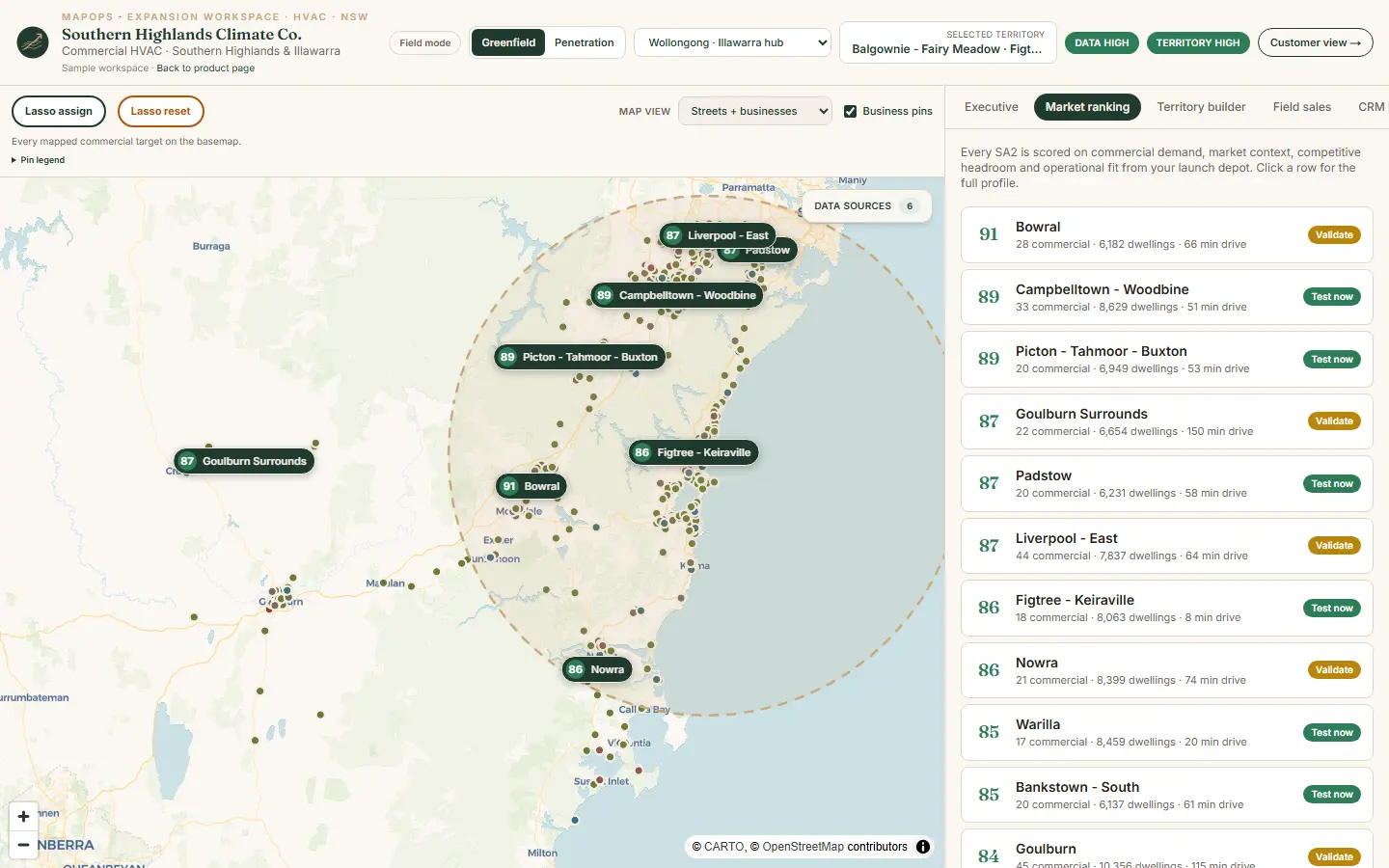
Product screenshot · book a demo for your trade and region
Live walkthrough
See australian hvac on a guided demo
We walk the Southern Highlands Climate Co. example on Illawarra regional data — ranked markets, territory builder, rep assignment, and prospect proof configured for australian hvac.
Ranked markets with climate and commercial demand scores
Competitor gaps and B2B account density by segment
Assigned commercial accounts on a street map
Local climate load and building stock context
The interactive map, lasso assign, and rep board are best on a screen share — not a phone browser. Book a walkthrough and we'll use your expansion question.
30 minutes · no obligation
Territory questions
What this workspace answers
MapOps Expansion Workspace configured for australian hvac — same product layout, industry-weighted scoring on regional data.
- 01
Which suburbs should we test for commercial HVAC first?
- 02
What is this territory worth in pipeline?
- 03
Who owns which aged care and healthcare accounts on the map?
- 04
Is the team actually working the assigned territory?
- 05
What do we send the prospect before a site visit?
Three views
Leadership, rep, and prospect — one system
The Southern Highlands Climate Co. sample workspace shows how the same territory plan flows from ranked markets to field execution.
Leadership view
- Ranked markets with climate and commercial demand scores
- Competitor gaps and B2B account density by segment
- Greenfield vs existing customer footprint
- Territory ROI from your conversion assumptions
Rep view
- Assigned commercial accounts on a street map
- A/B/C tier call list with phone and segment
- Lasso assign pockets to reps in one action
- Navigate, status, and notes per business pin
Prospect view
- Local climate load and building stock context
- Why maintenance or upgrade matters for this segment
- Service coverage and drive time from your depot
Sample workspace
Southern Highlands Climate Co.
Commercial HVAC · Southern Highlands & Illawarra
Walk the full Expansion Workspace on Illawarra regional data — ranked markets, territory builder, rep assignment, and prospect proof pages configured for australian hvac.
Regional data
Data weighted for this industry
Every MapOps region starts with public data — cleaned and kept current. This industry profile emphasises the signals that matter most for scoring and prospect context.
- 01
BoM-derived heating & cooling load by suburb
- 02
ABS Census dwellings, income and housing stock age
- 03
Mapped HVAC/trade competitors and B2B targets
- 04
Building approvals as a growth signal
- 05
Optional customer footprint by suburb
FAQ
Common questions · Australian HVAC
Is this a separate product from other MapOps industries?
No. Expansion Workspace is one product configured per industry. Australian HVAC is the most developed model; solar & electrical has a live Illawarra demo — other industries use the same layout with industry-weighted scoring.
What data powers HVAC territory scoring?
Census housing and income, BoM climate load, mapped commercial premises by segment, building approvals, and optional customer history — all visible on every suburb score card.
Can I see the product before booking a call?
Yes — book a 30-minute live walkthrough. We screen-share ranked markets, territory builder, rep tools, and prospect proof on real Illawarra NSW data, tailored to your trade and region.
Ready to walk through australian hvac?
Book a configured demo for your region — we'll use the Southern Highlands Climate Co. example on real NSW data.
If that sounds like you
You need 30 minutes on the product.
If you sell australian hvac by region, book the walkthrough. We use real NSW data and your expansion question.
If you book, you will see
- If you run australian hvac — we open the Southern Highlands Climate Co. workspace
- If you are choosing a suburb — we rank it on real NSW data
- If you are not sure it fits — we say so in the same 30 minutes
If you are not ready to book, send the brief.
Trade, region, and the suburb decision you are stuck on. Same-day reply.
Email contact@mapops.co30 minutes · no obligation · Australian team